Make vs Zapier, answered first: choose Zapier when the people building automations are not technical and volumes are modest; choose Make when workflows branch, loop or run thousands of times a month. As of September 2026 Zapier's paid plans start at $19.99 a month for 750 tasks and Make's at $9 a month for 10,000 credits (both on annual billing, per each vendor's pricing page) — a gap that widens quickly with volume. Zapier optimises for the person building their first automation; Make optimises for the complexity of the fiftieth.
Make vs Zapier: which is better for your team?
| Your situation | Choose | Why |
|---|---|---|
| Office managers, marketers and founders building their own automations | Zapier | The linear editor is the difference between automations existing and not existing |
| A niche app has to be connected | Zapier first | Zapier's site lists 9,000+ apps; Make's lists 3,000+ |
| Branching logic, loops over lists, API calls with pagination | Make | Routers, iterators, aggregators and error routes are built in |
| Thousands of runs a month | Make | Credit pricing is far cheaper than task pricing at volume |
| Someone technical builds once, others rely on it | Make | Better visibility into what data flowed where |
| You want full control and no per-run fee | Neither — look at n8n | Self-hosted, unlimited executions |
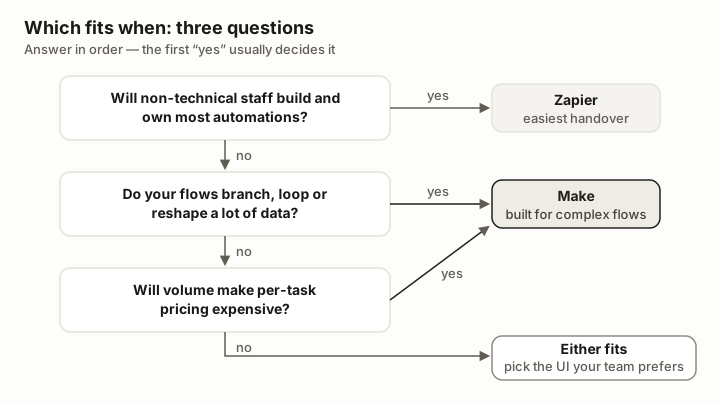
The short version, as a decision path. The first "yes" usually settles it.
The card above opens our side-by-side table, generated from the Make and Zapier product profiles, so scores and pricing reflect our current assessment.
How do Make and Zapier compare on pricing and features?
| Make | Zapier | |
|---|---|---|
| Free plan | 1,000 credits a month, 15-minute minimum interval | 100 tasks a month, two-step Zaps |
| Entry paid plan | Core: $9/month, 10,000 credits (annual billing) | Professional: $19.99/month, 750 tasks (annual billing; $29.99 monthly) |
| Team plan | Teams: $29/month, 10,000 credits | Team: $69/month, 2,000 tasks, 25 users (annual billing) |
| Unit of billing | Credit — roughly one per module executed | Task — one per successful action step |
| Apps | 3,000+ | 9,000+ |
| Editor | Visual canvas with branches | Linear steps; Paths for branching |
| Logic | Routers, iterators, aggregators, error handlers | Filters, Paths, Formatter, sub-Zaps |
| Any-API access | HTTP module on every plan | Webhooks on paid plans |
| Beyond automation | Data stores, custom apps | Tables, Forms (Interfaces), Chatbots, Agents |
| Digital4All score | 8.4 / 10 | 8.0 / 10 |
Table: Make vs Zapier, from the Make and Zapier pricing pages as of September 2026. Both vendors scale price with volume; the figures are each plan's starting point.
Is Make really cheaper than Zapier?
At any meaningful volume, yes — and the reason is the billing unit as much as the price.
Zapier counts a task for every successful action step. A five-step Zap that runs 1,000 times uses 5,000 tasks, which is several tiers above the $19.99 entry plan. Make counts a credit for roughly every module that executes, triggers included — so the same five-module scenario run 1,000 times uses about 5,000 credits, half of the $9 Core plan's monthly allowance.
| Workload per month | Make | Zapier |
|---|---|---|
| 10 simple two-step automations, 300 runs in total | Free plan covers it (about 600 credits) | Professional entry plan covers it (300 tasks); the free plan's 100 tasks do not |
| Enquiry pipeline: 8 steps, 1,000 runs | About 8,000 credits — inside Core at $9 | About 7,000 tasks — well above the 750-task entry tier |
| Data sync: 5 steps, 10,000 runs | About 50,000 credits — a higher Core or Pro credit tier | About 40,000 tasks — a high Professional or Team tier |
Table: worked examples using each vendor's published units as of September 2026. Exact prices at higher tiers come from the sliders on each pricing page and change often; model your own volume before committing.
In client accounts, equivalent workloads commonly cost a quarter to a third on Make of what they cost on Zapier. The exception is the very small account: a handful of simple automations costs little on either, and Zapier will have been quicker to build.
Which is easier to learn?
Zapier, by a wide margin, and that matters more than feature lists admit. A marketer can build "new form entry → add spreadsheet row → post to Slack" alone in ten minutes. On Make the same person would plausibly spend an afternoon: the canvas exposes data structures — bundles, arrays, mapping — that Zapier hides.
The investment pays back. Anyone comfortable with the idea of an array stops finding Make intimidating within a week, and from then on builds things that would be awkward or impossible in a linear editor. Make's execution log, which shows exactly what data entered and left each module, is also the better debugging tool — invaluable when an automation fails at two in the morning.
Which has more integrations — and does it matter?
Zapier's site lists more than 9,000 apps; Make's lists more than 3,000. For mainstream tools — Google Workspace, Microsoft 365, Slack, the major CRMs, Stripe, Shopify — both are covered, and Make's connectors often expose more of each app's API. The gap shows with niche and regional software: if you depend on a small vertical product, check Zapier first.
Make narrows the gap with its HTTP module, available on every plan, which calls any REST API without waiting for a connector. That is a developer's answer, though, not an office manager's.
Which is better for AI workflows and agents?
Both have moved quickly. Zapier has built outward into a lightweight platform — Tables, Forms, Chatbots and Agents alongside AI steps and a Copilot that drafts Zaps from a description. Make has added AI modules, AI agents and tighter connections to the major model providers, and its branching canvas suits the pattern most AI workflows follow: classify, then route.
We have not yet evaluated either vendor's newest agent features in depth, so we make no claim about which is ahead. For a plain "summarise this, classify that, draft a reply" step inside an automation, both do the job, and the usual rule applies: Zapier if a non-technical person owns it, Make if it is part of something larger.
What does a real workflow look like on each?
Consider a typical enquiry pipeline: a webhook receives a form submission, an AI step classifies it, a router sends new business to the CRM and existing customers to the helpdesk, and everything logs to a sheet. In Make this is one scenario of about eight modules, and a thousand enquiries cost a few thousand credits — comfortably inside the entry paid plan. In Zapier the same design needs Paths, consumes a task per action step per run, and lands in a materially higher tier at the same volume.
Now reverse the example: a one-step "new spreadsheet row, send a Slack message" automation that a marketer builds alone in ten minutes. That is Zapier's home ground.
The CRM at the end of that pipeline matters as much as the pipe — all three products in HubSpot vs Pipedrive vs Zoho CRM have connectors on both platforms. The same goes for finance systems: ERPNext exposes a full REST API that Make's HTTP module handles well, and Business Central has connectors on both. For the reporting end — pushing automation output into a sheet that feeds a dashboard — see Looker Studio.
Are there alternatives to Make and Zapier?
Three worth knowing. n8n is the fair-code option: free to self-host with unlimited executions, with a cloud version from €24 a month as recorded on our listing — the natural choice for technical teams and for data that must stay on your own server. Microsoft Power Automate is the default inside Microsoft 365 organisations. Native automation inside your CRM or ERP is often enough for single-system workflows and costs nothing extra.
Who should not choose each one?
Skip Zapier if your volumes are already in the tens of thousands of steps a month, if your workflows need loops and branches everywhere, or if cost per run is the constraint.
Skip Make if nobody on the team will invest a week in learning it, if your automations are all two-step conveniences, or if a niche app you rely on exists only on Zapier.
What does Digital4All recommend?
In client work we deploy both, and the split is consistent: Zapier for the team's self-service automations — the ones staff build and own themselves — and Make for the operational backbone — enquiry pipelines, data synchronisation, document generation — built once by someone technical and monitored properly. If you must pick one: modest needs and non-technical builders, Zapier; anything else, Make, and accept the fortnight of learning curve.
For where automation fits in the wider toolset, see our guide to the AI and automation stack for SMEs, or browse every platform we list under AI and automation. If you would rather have the backbone built and monitored for you, see our AI automation service or describe the workflow.
How we evaluated Make and Zapier
Both products carry scored Digital4All profiles (Make 8.4, Zapier 8.0 out of 10) based on building and running production scenarios and Zaps on each over several years; scores, pros and cons live on the listing pages. Plan prices, task and credit allowances and app counts in this comparison were re-read on the Make and Zapier pricing pages on 18 September 2026. The cost examples are arithmetic on those published units, not measured bills. Neither vendor's newest AI agent features has been evaluated by Digital4All yet. Updated 18 September 2026: decision table, pricing and feature table, worked cost examples, Zapier's 9,000+ app count (previously about 7,000) and an alternatives section.
Sources & further reading
- Make pricing page — credit-based plans: Free, Core, Pro, Teams, Enterprise (accessed 18 September 2026)
- Zapier pricing page — task-based plans: Free, Professional, Team, Enterprise; 9,000+ apps (accessed 18 September 2026)
- Zapier Help Center — how Paths and task counting work (accessed September 2026)
- Make Help Center — credits and how scenario runs consume them (accessed September 2026)